Sokoban Level Design: Build Solvable Puzzles
Good Sokoban level design begins with a solvable idea, not random walls and boxes. Give every box a plausible goal, create a route the player can understand, and use deadlocks to make decisions meaningful.
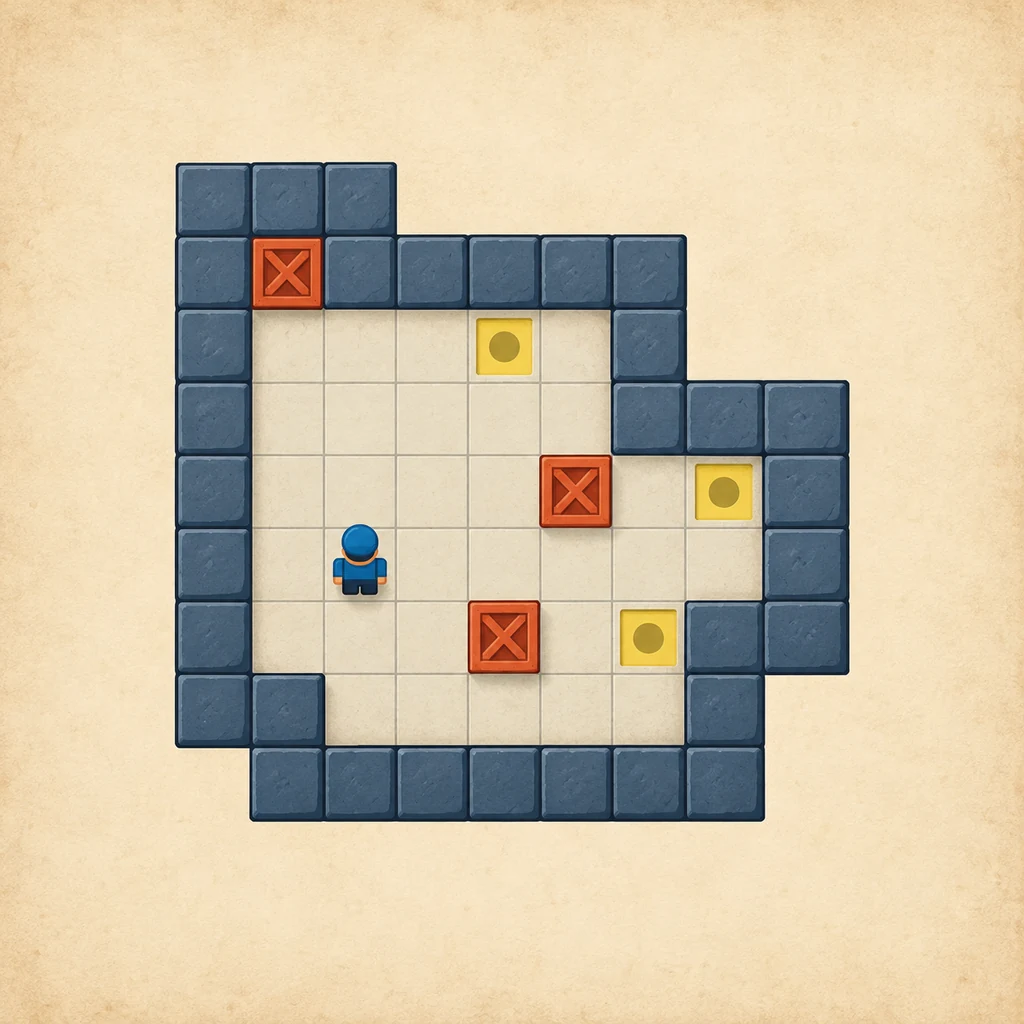
A designed board gives each crate a reason to move and leaves enough workspace for the player to make that plan.
The quick Sokoban level design answer
Start by deciding what the level should teach: goal order, a corridor commitment, a forced detour, or a player-positioning problem. Draw the finished arrangement first, then reverse the box moves to create a starting position. This grounds the puzzle in a known solution instead of a lucky random layout.
Before polishing artwork, check four basics: boxes equal goals, the player can reach the first useful pushing square, every box has a plausible route, and the level has a tested solution. A technically solvable level can still fail when its first decision is opaque or a harmless-looking push creates an invisible restart.
1. Set a solvability contract before drawing
A small design contract prevents the most expensive rework. For a standard Sokoban board, use one goal for every box and one player start. Decide whether boxes may begin on goals, whether an undo is available, and whether the level belongs to a beginner, intermediate, or expert pack. These decisions change how much risk the player can reasonably be asked to read.
Write the intended solution in plain language before placing every wall. For example: “The red box opens the lower lane, the blue box fills the deep goal, and the final push closes the upper corridor.” If playtests bypass the idea, the level may be too loose; if nobody discovers it, the hint or geometry needs work.
Separate permanent geometry from temporary obstacles. A non-goal corner, wall pocket, or one-tile lane is a permanent commitment. A doorway box is temporary only when the player can move it without losing the board.
A six-step Sokoban level design workflow
2. Draw the solved board first
Place the goals and boxes in their finished positions, then add the player and the floor needed to stand behind each final push. This makes the intended assignments visible. Check each goal's entry direction, especially beside walls.
Apply legal reverse moves: move a box away from a goal only when the square behind it could have held the player. Keep the walkable area connected; add challenge later without removing the square that makes the reverse sequence possible.
3. Protect player access, not just box routes
A box may have a clear geometric path while the player cannot reach the required side. For every planned push, record three positions: where the box is, where it will go, and where the player must stand. Then check whether the player can still reach the next useful side after the push. This catches levels that look open in a diagram but fail in play.
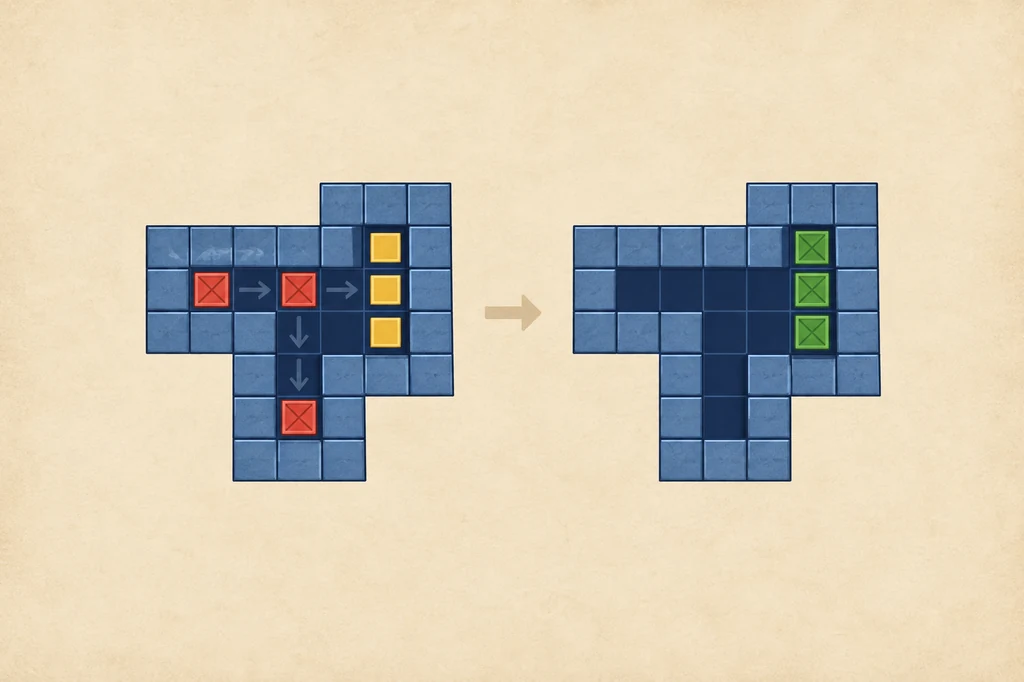
A good order keeps the deep target reachable and leaves a turning square for the next box.
4. Add deadlocks with a purpose
Deadlocks are part of Sokoban's language, but a designer should know which ones are intentional. A non-goal corner is an immediate dead square; a wall freeze, two-box block, or sealed corridor is more interesting because the player can avoid it by reading the board. Use one or two recognizable traps to teach the idea, then give enough information to recover before the commitment.
Do not hide every failure behind identical floor. A dangerous goal corner should be distinct, and an important approach lane should look worth preserving. Ask test players what they thought a failed push would accomplish; their answer shows whether the board communicates its consequence.
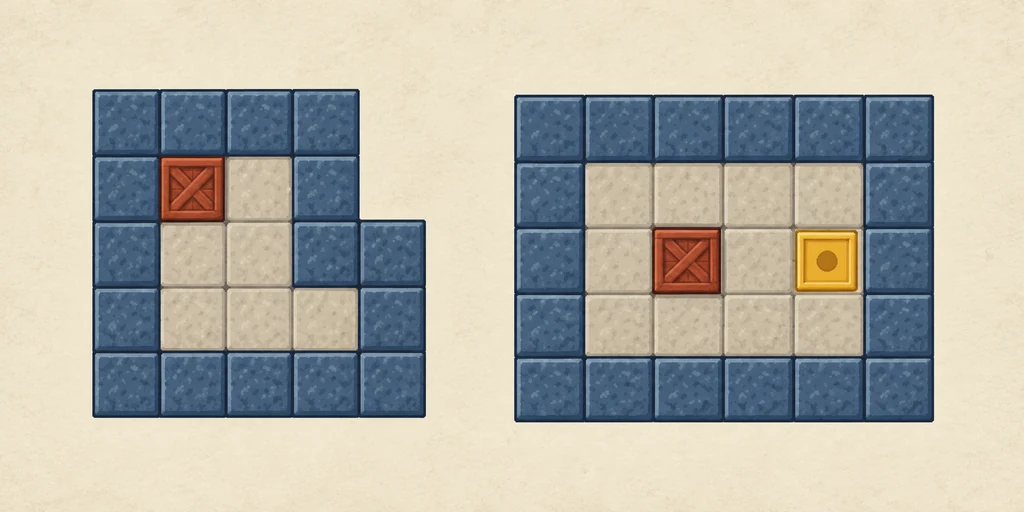
A corner trap is useful when it teaches a rule; it is frustrating when the board gives no clue that the square is permanent.
5. Tune difficulty through decisions
Difficulty should come from a few meaningful choices, not a crowded board. Start with a clear first action, then introduce one constraint at a time: a goal that must be filled first, a restricted box assignment, or a corridor that must stay open. Avoid a blind opening sacrifice unless experimentation is the lesson.
| Design lever | Fair use | Warning sign |
|---|---|---|
| Goal order | Make the deep target logically precede the near target. | Several orders fail for unrelated reasons. |
| Workspace | Leave one turning area and make its value readable. | The player cannot tell why access disappeared. |
| Box assignment | Give one box a restricted route and another some flexibility. | Only a pixel-perfect guess works. |
| Deadlock risk | Use a visible corner, wall, or corridor lesson. | The first mistake forces a long restart with no clue. |
6. Verify with a solver, then playtest without it
A solver is a correctness tool. It can reveal that a board has no solution, compare two box assignments, and show whether a supposedly difficult puzzle is actually solved by a short sequence. It does not tell you whether the intended route is legible, whether the pacing feels satisfying, or whether the level teaches the concept you wrote in your design contract.
Run at least three checks. First, solve from a clean start and save the move sequence. Second, try a different box order to see whether the board has an unintended shortcut. Third, give the board to a player who has not read your notes. Watch the first five minutes without explaining the solution. Record where they hesitate, which square they misread, and whether a restart feels deserved.
For small ASCII boards, the Sokoban solver online can confirm a route. For editing and exporting a Zeek puzzle pack, use the Zeek level editor guide. Keep the tools in their proper roles: design the experience first, then use software to verify it.
How to make a level harder without making it unfair
Increase dependencies before increasing box count. A compact two-box board can be harder than a five-box board if one early push determines every later route. Add a second solution only when you can explain how it differs; otherwise it may be an accidental shortcut.
Use visual rhythm to help players reason: distinguish walls, goals, and boxes, group related spaces, and avoid decorative corridors. A reset or undo can support experimentation, but it cannot replace readable geometry. Compare the result with the site's hardest-level guide and Sokoban strategy guide.
Finally, calibrate the finish. The last push should confirm the idea rather than introduce a new rule. If the level ends with a box on a goal but the player cannot tell why the previous order mattered, simplify the final room or add an earlier signpost.
Pre-publish checklist
Use this checklist after the board is playable and before exporting:
- Count the pieces. The number of boxes equals the number of goals, and the player has one valid start.
- Record a solution. Save a clean move sequence and note the key commitment that makes it work.
- Scan dead squares. Check corners, wall freezes, corridor seals, and two-box blocks before inviting testers.
- Check access after pushes. Confirm the player can reach the next required side, not only the box destination.
- Try a shortcut. Test a different box order and confirm it is either a valid alternate or a clearly explained dead end.
- Run a blind playtest. Give the level to someone without your notes and record where the plan becomes unclear.
- Export the right asset. Save the tested board, pack name, author note, and solution version together so a later edit does not invalidate the evidence.
Publish when the solution is reliable, the challenge is intentional, and a new player can learn from a mistake. Otherwise change the board before changing the instructions.
FAQ
How do you design a Sokoban level?
Choose a single lesson, draw a solved arrangement, reverse legal pushes, then test box assignments, player access, deadlocks, and difficulty with both a solver and human players.
How many goals should a Sokoban level have?
A standard level has exactly as many goals as boxes. Also check that every goal has a viable entry direction and is not accidentally sealed by another required route.
How can you make a Sokoban level harder without making it unfair?
Use readable ordering constraints, limited but visible workspace, and one meaningful route choice. Avoid hidden traps that require a blind restart.
Should a solver be used when designing Sokoban levels?
Yes. A solver confirms solvability and exposes shortcuts, while blind human playtests reveal whether the intended solution is understandable and enjoyable.
Can I build a level with the Zeek the Geek editor?
Yes. Use the editor guide for controls, testing, .zlv files, and export steps, then use this page's checklist to validate the design.
Summary
The strongest Sokoban levels are small arguments about cause and effect. Define the box-to-goal contract, build backward from a solved state, protect player access, make deadlocks readable, and test the intended lesson with people who have not seen your notes. Then export the exact board and solution you verified.
Reference notes
For a detailed deadlock taxonomy, see the Sokoban Wiki deadlocks reference. For a creator's discussion of backward generation and why random layouts become unsolvable, see this procedural Sokoban generation case study.
Build a board and test the idea
Start with a solved room, reverse a few legal pushes, and use the checklist before you add decoration. When the board is ready, try it in the Zeek browser game.
Open the editor guide Play Zeek online